Musculoskeletal disorders (MSDs) remain one of the most common causes of workplace injury in industrial environments. Tasks that involve repetitive motion, prolonged standing or prolonged sitting, awkward reaches, or poorly fitted workstations can place significant strain on the body over time.
Workplace ergonomics focuses on designing workstations, tools, and job tasks to fit the worker, helping reduce fatigue, prevent injury, and improve productivity. In industrial environments, poor ergonomic workstation setup can lead to musculoskeletal disorders, lost time incidents, and reduced efficiency.
Safety professionals understand that effective industrial ergonomics programs help reduce these risks by improving workstation design and worker posture. The challenge is getting employees to see its importance in their day-to-day work.
In many workplaces, experienced employees focus on completing tasks quickly and efficiently. If they have been performing the same job for years without obvious injury, ergonomic adjustments can feel unnecessary or even inconvenient.
Imagine a technician who has performed the same assembly task for ten years. They know exactly how to move, reach, and complete the job quickly. But speed often overrides posture or positioning. If the workstation height is slightly off or parts are just out of reach, workers may adapt by leaning forward or twisting repeatedly rather than stopping to adjust their setup.
Over time, those small compromises can lead to fatigue, discomfort, and eventually injury. Helping employees take ergonomics seriously requires more than providing equipment. It requires awareness, reinforcement, and a workplace culture that supports safer habits.
Even experienced workers may not realize when small habits begin to introduce unnecessary strain. Learning to recognize early warning signs is an important first step in improving workplace ergonomics.

Quick Checklist: Signs Workers May Be Ignoring Ergonomics
Before implementing solutions, it helps to recognize common warning signs on the floor. Workers may be struggling with ergonomics if you notice:
- leaning forward for extended periods
- repeated reaching or twisting during tasks
- working in the same position for long periods, whether sitting or standing
- static standing without support or movement
- shoulders raised while working at a bench
- tools or materials positioned outside comfortable reach
- employees not adjusting chairs, benches, or accessories
These behaviors often develop gradually and can become normalized over time, which is why they are easy to overlook.
Below are five practical ways organizations can encourage employees to engage with workplace ergonomics.
1. Start Ergonomics on Day One
One of the most effective ways to build ergonomic habits is to introduce them during onboarding.
When new employees are trained to properly set up their workstation from the start, they are less likely to develop unsafe working habits later. Even a short orientation on workstation setup, posture, and tool positioning can make a significant difference.
New hires should learn how to:
- adjust workstation height
- position tools and materials within easy reach
- maintain neutral working posture
- recognize early signs of fatigue or strain
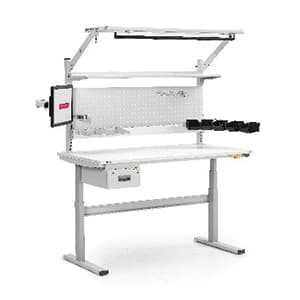
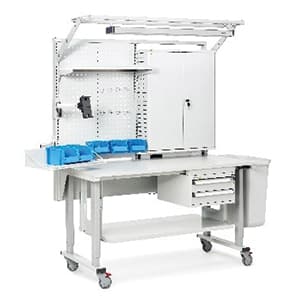
Workstations designed with adjustability make this process much easier. Height-adjustable benches and modular workstation systems allow employees to adapt the workspace to their body type and the task at hand.
2. Make the Right Setup the Easy Choice
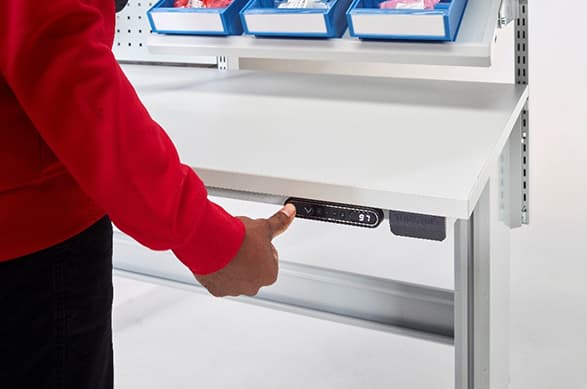
Providing ergonomic equipment is important, but employees are far more likely to use it when adjustments are simple and intuitive.
If changing the height of a workstation or repositioning accessories requires extra effort, workers may skip those adjustments and continue working in uncomfortable positions. The goal is to make the ergonomic choice the easiest choice.
Ergonomic work design should also account for posture changes throughout the day. Remaining in one position for long periods, whether sitting or standing, can increase strain and fatigue. Workstations that allow employees to easily adjust their working height or position help encourage natural movement and reduce the risks associated with static postures.
Effective ergonomic workspaces often include:
- adjustable workbenches (/p/quatrex-electric-height-adjustable-table-with-esd-top-30-x-48-gray)
- anti-fatigue floor mats
- ergonomic seating options
- adjustable lighting
- tool balancers or overhead supports
- shelving or storage that keeps materials within reach
These ergonomic workstation components help reduce repetitive motion, awkward posture, and excessive reaching, all of which are common causes of musculoskeletal disorders in industrial environments.
Expert Insight
“We all want to work comfortably and safely and feel that our work is meaningful and productive. When workstations are designed with ergonomics in mind and adjustments are quick and intuitive, people naturally work in more ergonomic ways, improving both comfort and productivity.”
Jonna Patama
Ergonomist, Treston Group
Workstations that are designed for adjustability help make the ergonomic choice the easy choice. When workers can quickly adapt their workspace to fit their body and the task at hand, they are far more likely to maintain comfortable and safe working positions throughout the day.
3. Reinforce Good Habits with Regular Ergonomic Assessments
Ergonomic improvements should not be treated as a one-time project.
Over time, workspaces change. Tools get moved, tasks evolve, and workers develop shortcuts that may introduce strain. Periodic ergonomic assessments help identify these issues early.
Routine evaluations can help safety teams spot:
- repetitive reaching patterns
- excessive twisting or bending
- materials positioned too far from the worker
- workstation heights that no longer fit the task
Regular ergonomic assessments help identify ergonomic risk factors before they lead to injury, helping reduce musculoskeletal disorders and lost-time incidents.
For example, a workstation may have been properly configured when first installed, but parts storage may have gradually shifted farther away. That small change could require dozens of extra reaches per hour.
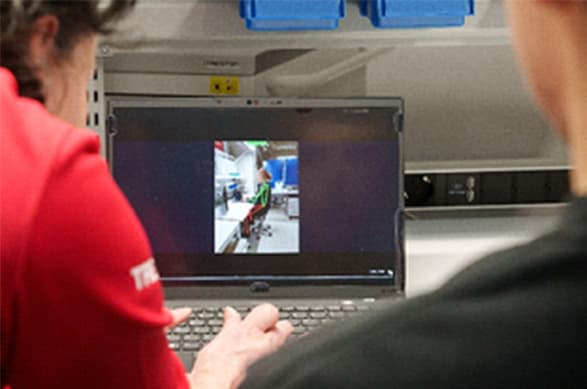
Simple ergonomic reviews, whether monthly or quarterly, help maintain a safer working environment and keep ergonomic practices top of mind.
4. Build Ergonomics Into the Safety Culture
Employees are more likely to care about ergonomics when they see it reinforced consistently.
Rather than treating ergonomics as a separate initiative, successful organizations integrate it into their broader safety culture.
Practical ways to do this include:
- discussing ergonomic tips during safety meetings
- encouraging workers to report discomfort early
- recognizing improvements to workstation setups
- training supervisors to identify ergonomic risks
When workers see that leadership prioritizes comfort and long-term health, they begin to view ergonomics as an important part of doing their job safely.

5. Recognize and Reward Ergonomic Best Practices
The benefits of ergonomics are often long-term, which means employees may not immediately see the impact of small adjustments. Recognition programs can help reinforce positive behavior.
Examples include:
Recognition programs
Highlight employees who consistently demonstrate safe ergonomic practices.
Participation incentives
Encourage workers to attend ergonomic training or participate in workstation assessments.
On-the-spot recognition
Supervisors can acknowledge employees who make thoughtful adjustments to improve their setup.
These programs encourage workers to take ownership of their workspace and reinforce the importance of safe working habits.
Why Ergonomics Matters for Productivity and Safety
At its core, ergonomics is about helping people work more comfortably and efficiently.
When workspaces support proper posture and minimize unnecessary strain, employees often experience:
- reduced fatigue
- improved focus
- fewer injuries
- greater job satisfaction
For organizations, that translates into fewer lost-time incidents, improved productivity, and a healthier workforce.
Key Takeaways for Safety Leaders
If you want employees to take workplace ergonomics seriously, focus on these steps:
- introduce ergonomic training during onboarding
- provide adjustable equipment that is easy to use
- schedule regular ergonomic assessments
- reinforce ergonomics during safety discussions
- recognize employees who follow best practices
When ergonomic practices become part of everyday work rather than an occasional reminder, organizations can move from reacting to injuries to preventing them altogether.
See the full line of Treston workbenches, shelves, and accessories at Global Industrial.
Frequently Asked Questions
What is workplace ergonomics?
Workplace ergonomics focuses on designing workstations, tools, and tasks to fit the worker. Proper ergonomics can help reduce physical strain, fatigue, and the risk of musculoskeletal disorders while supporting productivity.
What are common signs of poor workplace ergonomics?
Common signs include prolonged leaning, repeated reaching or twisting, working in the same position for long periods, raised shoulders, poorly positioned tools or materials, and employees not adjusting chairs, benches, or other workstation accessories.
How can ergonomics be introduced during employee onboarding?
Employees can learn ergonomic practices during onboarding by being shown how to adjust workstation height, position tools and materials within easy reach, maintain a neutral working posture, and recognize early signs of fatigue or strain.
What equipment can improve workplace ergonomics?
Ergonomic workspaces may include adjustable workbenches, anti-fatigue floor mats, ergonomic seating, adjustable lighting, tool balancers, overhead supports, and shelving or storage that keeps materials within easy reach.
Why are adjustable workstations important for workplace ergonomics?
Adjustable workstations allow employees to change the height or position of their workspace to better fit their body and the task. Easy adjustments can encourage better posture and reduce the strain associated with awkward or static positions.
How often should workplaces conduct ergonomic assessments?
Ergonomic assessments can be performed regularly, such as monthly or quarterly, depending on the workplace and tasks involved. Routine evaluations help identify changes in workstations, tools, and work practices that may introduce new ergonomic risks.
What ergonomic risks should regular assessments identify?
Regular assessments can identify repetitive reaching, excessive twisting or bending, materials positioned too far from workers, and workstation heights that no longer fit the task. Identifying these issues early can help reduce ergonomic risks.
How can companies encourage employees to take ergonomics seriously?
Companies can reinforce ergonomics through onboarding, safety meetings, regular assessments, supervisor training, and recognition of employees who follow good ergonomic practices. Making ergonomic adjustments easy and part of everyday work can also encourage participation.
How can ergonomics improve workplace safety and productivity?
Good ergonomic practices can reduce fatigue and unnecessary physical strain while supporting proper posture and more comfortable work. This can contribute to fewer injuries, improved focus, greater job satisfaction, and better productivity.
Why should ergonomics be part of a company's safety culture?
Treating ergonomics as part of the overall safety culture keeps it from becoming a one-time initiative. Regular training, assessments, safety discussions, and employee recognition help make ergonomic practices part of everyday work.
The information contained in this article is for informational, educational, and promotional purposes only and is based on information available as of the initial date of publication. It is the reader’s responsibility to ensure compliance with all applicable laws, rules, codes and regulations. If there is any question or doubt in regard to any element contained in this article, please consult a licensed professional. Under no circumstances will Global Industrial® be liable for any loss or damage caused by your reliance on this article.